External GPIO Pinmap — Rev 2.0
The XM10 Rev 2.0 board provides 8 digital IO (DIO) pins and 4 dedicated analog input (ADC) pins on its external expansion header. Any of the 8 DIO pins can be switched to ADC mode at runtime, giving you up to 12 ADC channels total.
For the API (function calls) to use these pins, see External IO API. This page focuses on board pin layout.
Header Location
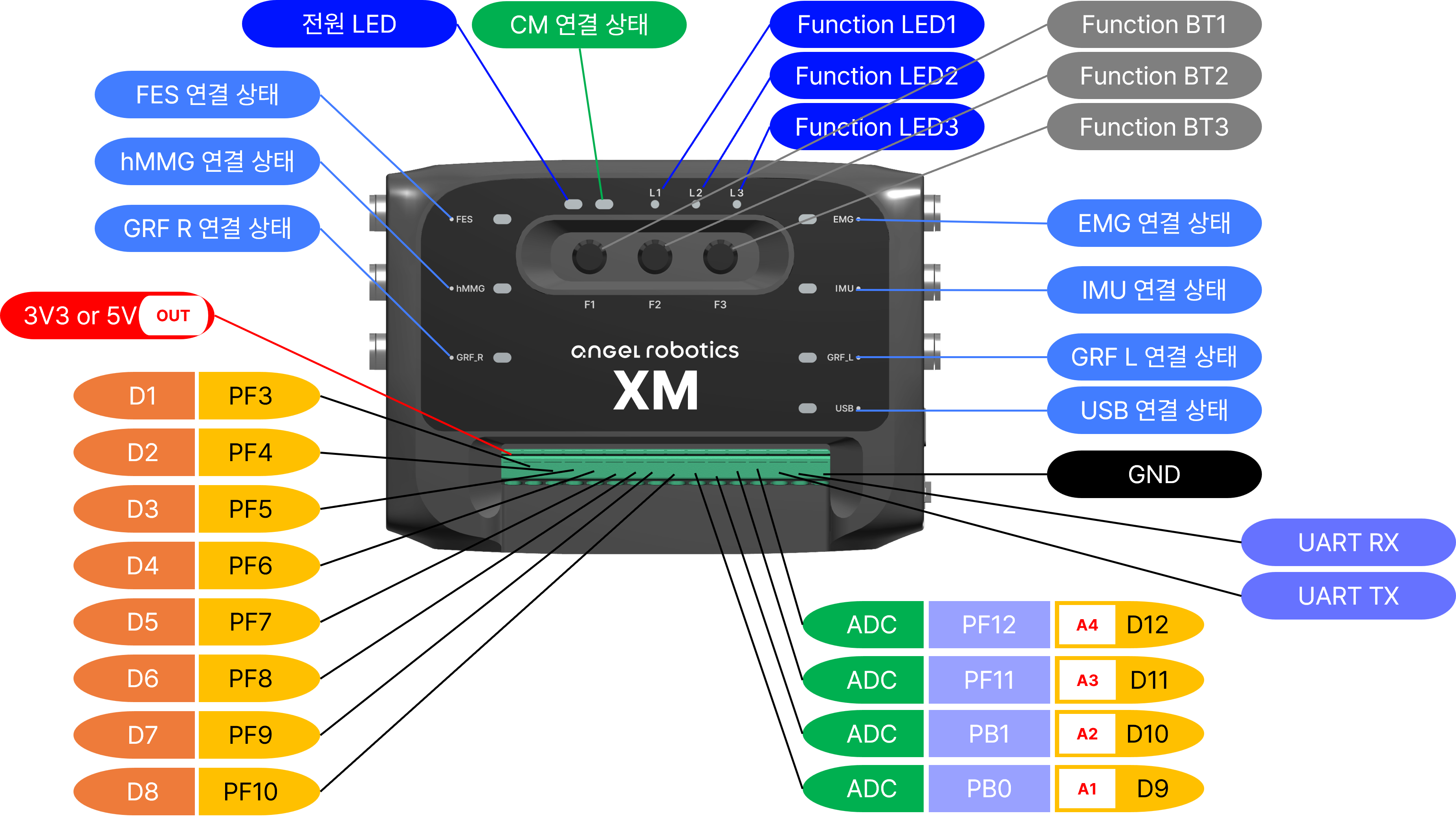
Use the photo above to locate the external GPIO header (DIO 8 + ADC 4) on the Rev 2.0 board and to identify the pin 1 orientation. The per-pin function assignments follow the tables below.
DIO 8 Pins
| API Name | PCB Label | Default Mode | Notes |
|---|---|---|---|
XM_EXT_DIO_1 |
EXT_GPIO_1 | Digital | Can be switched to ADC |
XM_EXT_DIO_2 |
EXT_GPIO_2 | Digital | Can be switched to ADC |
XM_EXT_DIO_3 |
EXT_GPIO_3 | Digital | Can be switched to ADC |
XM_EXT_DIO_4 |
EXT_GPIO_4 | Digital | Can be switched to ADC |
XM_EXT_DIO_5 |
EXT_GPIO_5 | Digital | Can be switched to ADC |
XM_EXT_DIO_6 |
EXT_GPIO_6 | Digital | Can be switched to ADC |
XM_EXT_DIO_7 |
EXT_GPIO_7 | Digital | Can be switched to ADC |
XM_EXT_DIO_8 |
EXT_GPIO_8 | Digital | Can be switched to ADC |
Electrical specifications:
- Input / Output: 3.3 V logic
- Internal pull-up / pull-down resistors: supported (select via XM_SetPinMode)
For differences from Rev 1.1, see Board Revision Comparison.
ADC 4 Pins (Fixed)
| API Name | PCB Label | Notes |
|---|---|---|
XM_EXT_ADC_1 |
EXT_ADC_1 | 16-bit analog input only |
XM_EXT_ADC_2 |
EXT_ADC_2 | 16-bit analog input only |
XM_EXT_ADC_3 |
EXT_ADC_3 | 16-bit analog input only |
XM_EXT_ADC_4 |
EXT_ADC_4 | 16-bit analog input only |
Electrical specifications: - Input range: 0 – 3.3 V - Resolution: 16-bit (native); the API can return 8 / 10 / 12 / 16-bit values - Sampling rate: 10 kHz
DIO → ADC Dynamic Switching (8 Additional Channels)
Switching DIO pins to ADC mode at runtime gives you up to 12 ADC channels. Call XM_SwitchDioToAdc(), then read the value with XM_AnalogRead(XM_DIO_TO_ADC_PIN(dio)).
| API After Switching | Original DIO |
|---|---|
XM_EXT_ADC_5 |
DIO 1 |
XM_EXT_ADC_6 |
DIO 2 |
XM_EXT_ADC_7 |
DIO 3 |
XM_EXT_ADC_8 |
DIO 4 |
XM_EXT_ADC_9 |
DIO 5 |
XM_EXT_ADC_10 |
DIO 6 |
XM_EXT_ADC_11 |
DIO 7 |
XM_EXT_ADC_12 |
DIO 8 |
Once switched, a pin stays in ADC mode until the board is reset. This is intentional — it protects against accidental mode changes at runtime.
Notes on Using an External IMU
Activate an external IMU (e.g., Xsens MTi series) with XM_AttachXsensMTi630(). On Rev 2.0, the IMU uses the dedicated USART2 port, so no external ADC pins are occupied.
For activation details, see External IO API — External IMU Control
Common Issues
| Symptom | Solution |
|---|---|
| ADC reads always 0 or 3.3 V only | Missing pull-down resistor or short circuit. Check the FSR voltage-divider circuit (FSR — DIO pin — 10 kΩ — GND). |
| Cannot switch back to DIO after ADC mode | Reset the board or cycle the power. This is intentional safety behavior. |
DigitalWrite is ignored |
The pin is currently in ADC mode. Use the ADC API to interact with it. |
| High ADC noise | Use a short jumper wire, ensure a common GND, and add an external RC filter if needed. |
See Also
- Integrated hardware overview: hardware/README.md
- Rev 1.1 pinmap: external-gpio-rev1.1.md
- Function reference: External IO API
- Hands-on examples: Ex.04 – 05d Ext IO Series